Most federal notices about cybersecurity don't say "cybersecurity"
How we rebuilt SpendQuery's topic search with AI at night and a single AI call per search, for about $3.50 of model time.
The problem
On October 9 we ran a simple test on SpendQuery, our search tool for U.S. federal contracting data. We looked for open opportunities about “cybersecurity”. It found two notices. A search for “cloud migration” found none.
There were plenty more. The Air Force’s CNECTS notice (FA251827RCNECTS) is plainly cybersecurity work, and our search missed it completely. A contractor using SpendQuery would never have seen it.
We traced the misses to four causes:
- Titles don’t use the topic’s words. Contracting officers write titles like “Enterprise IT Support Services” or a program acronym. The word “cybersecurity” sits three paragraphs down, if it appears at all.
- Descriptions are full of boilerplate. Almost every notice includes standard clauses about cybersecurity, supply chains and small business. Matching on description words brings back hundreds of notices that only mention the topic in a required clause.
- Meaning-based search wasn’t enough. Our vector embeddings covered only about a third of notices, and short queries score low: the best match for a one-word search came in at 0.36. When we built a candidate pool from meaning alone, only 2 of the top 60 notices were relevant.
- There was no judgment step. Nothing asked whether a notice was actually about the topic or just mentioned it.
What we set out to build
We set three limits before writing any code:
- About a cent per new search in model costs. Repeat searches should be free.
- No controlled information sent to the AI. Text marked CUI or FOUO, and export-controlled text, is removed before anything leaves our servers.
- A clean fallback. If the AI is off, over its daily budget or slow, search still works and still tells the truth.
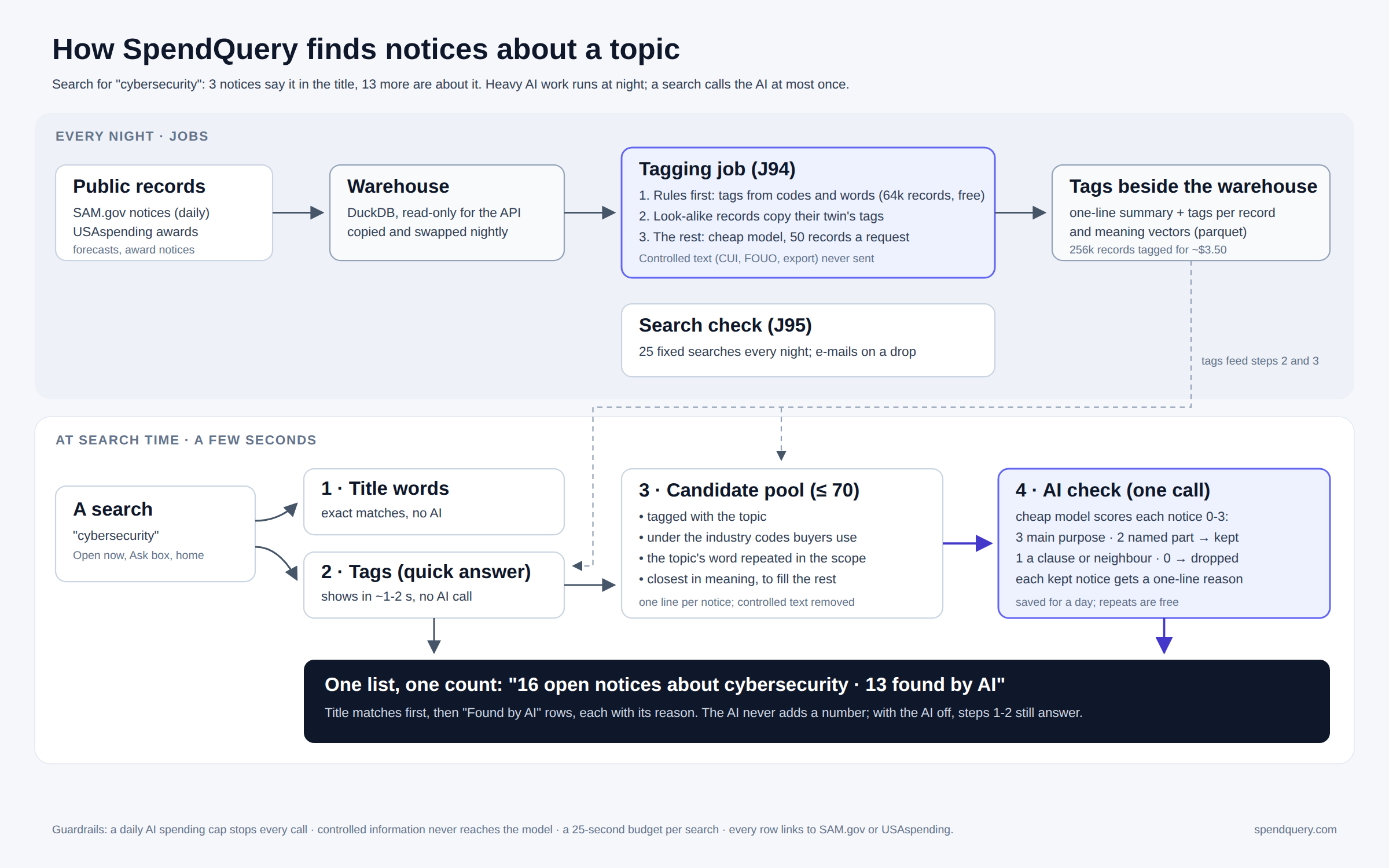
That ruled out the obvious approach of sending every search through a large model over the whole database. Instead we split the work into two parts: heavy work done once at night, and light work done at search time.
Every night: tag everything once
A nightly job (J94 in our scheduler) reads new and changed records from the warehouse. That covers SAM.gov opportunity notices and USAspending awards. The job gives each record a one-line summary, a set of topic tags and a meaning vector. It works in order of cost:
- Rules first, free. Industry and product codes already say a lot. A notice under NAICS 541512 or PSC DA01 is IT work. Rules alone tagged 63,758 records without any model call.
- Twins copy their tags. Federal data is full of near-duplicates: amendments, re-posts and the same requirement at several bases. When a record matches one we have already tagged, it copies those tags.
- The rest go to a small model, 50 records per request. We use a fast, cheap model (Claude Haiku) with a fixed tag vocabulary and a short summary limit. Batching 50 records into one request keeps the cost per record tiny.
The tags are stored as files beside the warehouse, not inside it. The warehouse stays read-only for the API and is swapped in whole each night; the tags have their own life cycle.
The backfill: about 256,000 records tagged, about 165,000 of them read by the model, for about $3.50 billed.
One lesson came out of that number. Our internal cost tracker had the small model’s price set 11 times too high, so it reported $37. Check your own cost tracking against the bill.
At search time: four steps, one AI call
When someone searches for “cybersecurity”, four steps run:
- Title words, no AI. Exact matches in the title come first, as before. These are the results people already trusted.
- Tags, no AI. Notices tagged with the topic show up in about 1–2 seconds. This is the quick answer, and it is also what users see if the AI is unavailable.
- A candidate pool of up to 70 notices, drawn from four places: notices tagged with the topic, notices under the industry codes buyers use for it, notices that repeat the topic’s word in their scope (not just once in a clause), and the closest notices by meaning (above a 0.20 floor) to fill any remaining room.
- One AI check. The model gets one line per candidate, with controlled text already removed. It scores each notice from 0 to 3:
We keep 3s and 2s, each with a reason under 14 words that we show to the user. The result is saved for a day, so repeat searches cost nothing.
- 3: the topic is the main purpose
- 2: the topic is a named part of the work
- 1: it appears only in a clause or a neighbouring area
- 0: unrelated
One tuning note: our first prompt said “when unsure, score 1”. It was too strict and dropped nearly everything. Removing that line and letting the scale speak for itself worked much better.
The result
“Cybersecurity” now returns 16 open notices: 3 title matches and 13 found by AI. The CNECTS notice is among them.
We show one list with one count, with title matches first. AI-found rows carry a “Found by AI” label and their one-line reason. The label matters because the search box promises “words in the title”. When we show something beyond that promise, we say so and explain why. The AI never invents a number. Counts come from the database, and the AI only decides which rows belong.
Speed
Before October 10, topic searches took 11–18 seconds. Now tagged results appear in about 1–2 seconds, and the AI-checked list follows. Popular pages are built ahead of time and load in 0.2–0.4 seconds instead of 13–16. Every search has a 25-second budget. If the AI step can’t finish in time, the user still gets steps 1 and 2.
Keeping it honest
- A nightly search check (J95) runs 25 fixed searches and e-mails us if result counts drop. Each check costs about a tenth of a cent in model time.
- A daily AI spending cap stops every model call once it’s reached; search falls back to the no-AI steps.
- Every row links to its source on SAM.gov or USAspending, so anyone can verify it.
What it still gets wrong
- The AI can be wrong. That’s why every AI-found row shows its reason: you can judge it in a second.
- Tags can let a weak match through when a notice is tagged broadly.
- The repeated-word check misses synonyms. “Information assurance” doesn’t count as “cybersecurity” in that step, though tags and meaning often catch it.
- About 3% of notices have no description, so only the title and codes are available for them.
What’s next
The same pattern applies beyond federal notices. We’re bringing state and local bids into SpendQuery, starting with 331 California opportunities from Cal eProcure, and they will go through the same nightly tagging. The design that made this work is general: do the expensive reading once, ahead of time; at search time ask the model one narrow question; and always show users what the AI decided and why.
Try it at spendquery.com. Search for a topic you bid on and look for the “Found by AI” rows.